


You’re almost done!
Congratulations on the progress you have made on your new Micro-course. We are excited to have you on board and look forward to hosting your wonderful course.
To ensure smooth running for your course on the kadenze.com platform, there are some final settings to be decided. The Kadenze team is available to help you clarify these Micro-course settings.
Review your final Micro-course settings
Before publishing your Micro-course on kadenze.com, there are important settings you will need to configure. These include meta information and Search Engine Optimization (SEO) settings which help learners find your course and determine if it is a good fit for them. It also enables search engines to index and rank your content so it’s discoverable and helps to populate search engine results with targeted information so you can reach the widest audience possible.
We appreciate you working on these settings. Final approval to publish will be made by the Kadenze team.
Settings
Expand the sections below to view instructions for each setting type.
General
Your General settings are located under Course Settings > Course Information.
Here you will configure core aspects of your course such as 1) name; 2) start date; 3) enrollment options; and 4) other course options.
Note: Under the Enrollment Options section, these options default to off. If you would like to receive a notification each time a student completes the course, simply toggle on Send notification email when student completes the course.
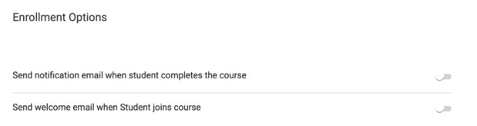
Please keep the Welcome Email toggled off from the Enrollment Options and instead set up your course welcome email from Announcements, which will be sent to students automatically when they sign up for your course.
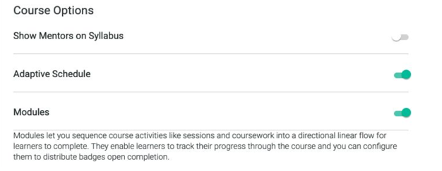
Under Course Options, you’ll most likely want to have Adaptive Schedule and Modules toggled on (as seen below). Adaptive Schedule will allow students to enroll anytime and go at their own pace, and Modules let you sequence course activities like sessions and coursework into a directional linear flow for learners to complete.
Course information
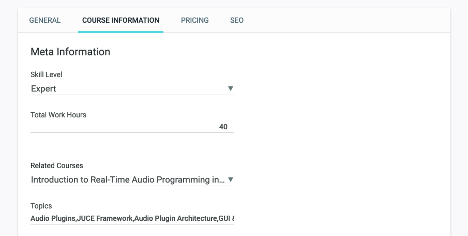
The info you enter here will populate on the public-facing landing page for your course, so do your best to make sure it’s accurate and concise.
- Select a Skill Level from the drop-down
- The total number of work hours you input will be divided by the number of sessions in your course, and will be displayed like so on your course’s public landing page:

[24 work hours total, spread across 4 sessions]
- Select up to 3 related courses that you have on Kadenze or others from our catalog. This is a great way to cross-promote your own courses!
- Please add a maximum of no more than 6 topics to your course (less is okay, too). If you include a very broad topic such as “art,” it’s best to also include more focused topics like “storytelling” or “graphic novels” to help students understand specifically what your course is about before jumping in.

Pricing
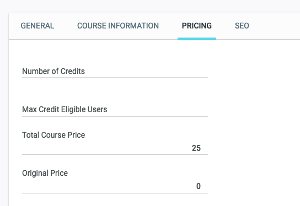
To set a price for your course, enter a dollar amount in Total Course Price.
You will have established the price with Kadenze when you signed the Micro-course Agreement. Please enter the agreed price. Prices for our Micro-courses are often set at $25, $50, or $75.
Lastly, please leave Number of Credits, Max Credit Eligible Users, and Original Price blank.
Search engine optimization (SEO)
These fields are located under Course Settings > SEO.
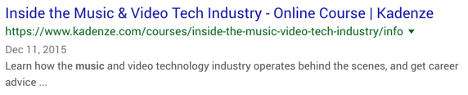
The meta title, description, and keywords you enter under the SEO tab will be used by search engines. The title and description you enter will often appear in search results, so it’s important to make a strong first impression. Here is an example of how this information may appear:
Meta Title
The best title for your course is one that is descriptive, specific, and concise. Long titles get truncated in search results, and titles with overt sales language (“FREE! BUY NOW!”) tend not to perform well.
Meta Description
The best meta description is descriptive, specific, and concise. Moreover, it’s best to lead with the most important content, as you typically only get one line of text visible in a search preview. Instead of writing “In this course you will learn…” just jump right in with the action items: learn to produce electronic music, paint with watercolors, jumpstart your career as a creative entrepreneur, and so on. Search engines also prefer full, natural-sounding sentences, so while it may be tempting to cram in a list of keywords in this section, a single descriptive sentence will do much better.
Meta Keywords
Keywords should be entered as a comma separated list.