

Consider how to produce effective video
A key aspect of production is the quality of video and sound. For video, you will need to shoot at a minimum resolution of 1080p. Many recent smartphones have this capability. If possible, film in a place that has ample light. For sound, record somewhere quiet and without echo, as much as possible. The resources below will guide you through making choices about what tools to use and how to use them.
Film some practice shots and test your audio
Not everyone will be comfortable immediately in front of a camera, and that’s ok. Take some time to practice reading your script or other material in front of a camera or phone. Keep practicing until you have reached a point where reading or speaking in front of a camera feels natural to you.
Gather your tools and start filming
After practicing, think of ways you want to put your script into action. In most cases, your video learning objects will fall under these 2 types:
- Lecture/video lessons – An instructor addresses a camera while explaining certain concepts.
- Screen capture recording – An instructor explains a demo or powerpoint presentation, with audio voice-over or face camera in smaller window.
Keeping that in mind, take the time to determine what kind of presentation would best suit your content. We encourage you to try and use the highest quality of tools that are accessible to you. If you’re not sure where or how to start in filming your course on your own, take a look at the following resources for some starting ideas:
- How to Record High-Quality Videos for Online Courses at Home
- How to Shoot Great Video With Your Smartphone
- How to Record Your Computer Screen
- 3 Effective Ways to Record Your Online Course
- How to Record Quality Sound for Your Online Course
- Audio Basics for Online Course Design
- Audio in eLearning: 7 Golden Rules for eLearning Professionals
- Audio equipment on a budget
Many of our authors recommend the easy-to-use teleprompter from BigVu which you can try out in a free trial.
Three video lesson exemplars
Here are three commonly used examples of what a Micro-course lesson can look like. We understand that not all instructors will have the same access to the tools and equipment used in these examples, but we encourage you to be as professional as you can with what you have!
Exemplar one
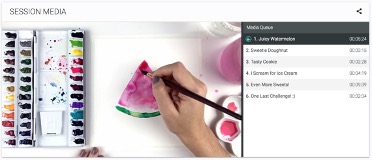
Here you can see how this instructor has filmed their lesson as an overhead shot so the viewer has a clear view of the entire demonstration. The lighting is bright and all the items in the composition are in focus.
Exemplar two
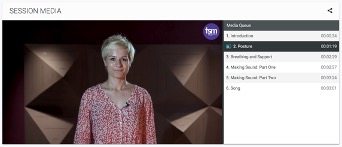
In this example, the instructor is in front of the camera and addressing the audience directly. The instructor is standing right in the center of the frame, helping them to be the main line of focus for this lesson. There is also an abstract but simple background that creates an interesting contrast from the instructor. A creative background is not required but can be helpful in designing a specific tone for your course.
Exemplar three
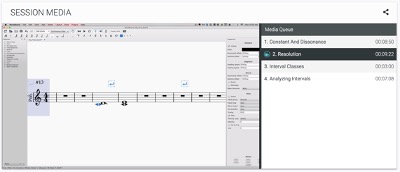
Here is an example of what a lesson using screen capture footage can look like. Usually for screen capture lessons, the instructor will simultaneously record the demo on their screen while also narrating what they are doing. Make sure that the footage is clear as in the example image and not blurry or pixelated.
Film a promotional video
This should be a 1-min introduction that outlines what the course is, what students will cover in the course and what the benefit will be for them.
Check out these promotional videos for ideas:
WATCH: Electronic Music Production with John Tejada
WATCH: Music Theory Level 1: Part One with Jason Allen